There is already a popular article floating around on how to "use NVIDIA Nemotron 3 Ultra with Hermes agent." It tells you the model is big, the architecture is mixture-of-experts, it is "five times faster," and you should click around a dashboard. It contains no config, no commands, no error messages, no benchmarks, and no troubleshooting. If you actually wire Nemotron 3 Ultra into Hermes as your agent driver and start doing real work, you will hit problems that article never mentions — and you will have no idea why.
This is the version I wish I'd had. It comes out of an actual debugging session: Nemotron 3 Ultra driving a Hermes agent, building a multi-file website, where every large generation kept dying mid-write. By the end you will have a profile that works, you will understand why the defaults fail, and you will know exactly which knobs matter.
TL;DR — the working config
If you just want the answer, here is the Hermes profile config.yaml that works. The rest of the article explains every line.
custom_providers:
- name: nvidia-ultra
  base_url: https://integrate.api.nvidia.com/v1
  key_env: NVIDIA_API_KEY
  api_mode: chat_completions
  # Nemotron 3 Ultra streams slowly and in bursts. The default 240s
  # stale-stream watchdog + httpx read timeout kill long generations
  # mid-tool-call. Give slow bursts room.
  request_timeout_seconds: 1800
  stale_timeout_seconds: 900
  models:
    nvidia/nemotron-3-ultra-550b-a55b:
      # NVIDIA's hosted NIM serves a 256K native window by default.
      context_length: 262144
  extra_body:
    # NVIDIA-recommended inference settings (HF model card):
    chat_template_kwargs:
      enable_thinking: true
      force_nonempty_content: true   # required for tool use + thinking
    temperature: 1.0
    top_p: 0.95
    max_tokens: 65536
model:
  provider: custom:nvidia-ultra
  default: nvidia/nemotron-3-ultra-550b-a55b
  context_length: 262144
The model id is nvidia/nemotron-3-ultra-550b-a55b, served OpenAI-compatible at https://integrate.api.nvidia.com/v1 (the build.nvidia.com developer-portal endpoint). You need an NVIDIA_API_KEY.
What Nemotron 3 Ultra actually is
Nemotron 3 Ultra is a 550B-total / ~55B-active hybrid Mamba-Transformer mixture-of-experts model from NVIDIA, built specifically for long-running autonomous agents: tool calling, coding, deep research, orchestration. The "active parameters" framing is the useful part — you get frontier-scale reasoning at a fraction of the per-token compute, which is exactly why it is interesting as an agent driver rather than a one-shot chat model.
Two facts matter more for setup than the marketing does:
- It is a reasoning-first model. Its strength is extended thinking across multi-step tasks. Run it with reasoning off and you are paying for a Ferrari to sit in the driveway.
- It streams slowly. On the hosted endpoint, large responses arrive in bursts with long quiet stretches in between. This is the single thing that breaks naive setups, and the thing the fluff articles never warn you about.
Hermes is the agent layer
Hermes (NousResearch) is the harness: sessions, tools, memory, skills, terminal access, editor integration, and crucially a profiles system so you can keep one isolated config per model backend. A profile is its own HERMES_HOME — its own config.yaml, credentials, sessions, and logs. That isolation is what makes a dedicated nemotron-ultra profile clean.
Nemotron is the brain; Hermes is the body. The interesting engineering is at the seam between them, and that seam is where things broke.
The failure nobody warns you about
Here is what actually happened. The agent was driving a website build — several large HTML files written via tool calls. Short turns were fine. Then every large generation started failing, over and over, in a loop. The profile's logs/errors.log was full of this:
WARNING agent.chat_completion_helpers: Stream stale for 240s (threshold 240s)
  — no chunks received. model=nvidia/nemotron-3-ultra-550b-a55b
  context=~53,364 tokens. Killing connection.
WARNING agent.stream_diag: Stream drop mid tool-call on attempt 3/3 — retrying.
  error_type=ReadTimeout ... bytes=65417 chunks=115 elapsed=265.71s ttfb=4.65s
WARNING agent.chat_completion_helpers: Partial stream dropped tool call(s)
  ['write_file', 'write_file', 'write_file'] after 321 chars of text;
  surfaced warning to user: The read operation timed out
Read that last line carefully. The model was in the middle of emitting three write_file tool calls when the connection was torn down. The files never landed. The agent retried, hit the same wall, and the session wedged.
Root cause
Hermes has a stale-stream watchdog. If a streaming response delivers no chunks for some window (scaled up to 240s for medium-large contexts), Hermes assumes the connection is dead and kills it so the retry loop can reconnect. There is also a matching httpx read timeout on the socket. Both are tuned for typical cloud models that stream fairly continuously.
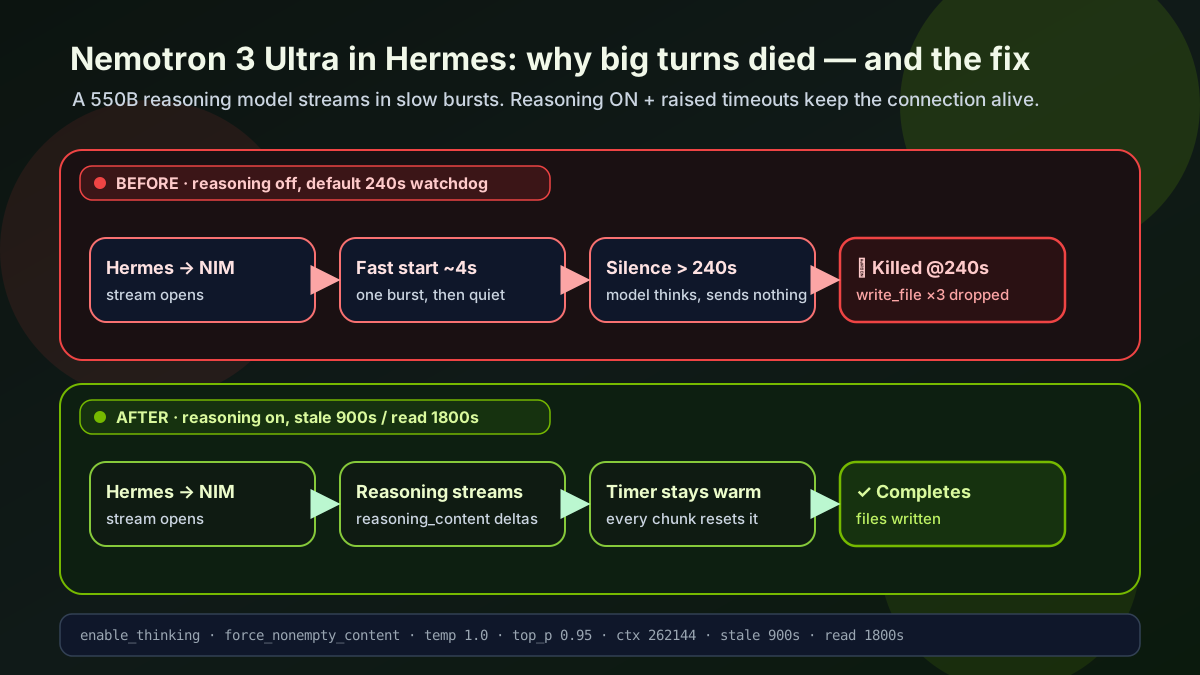
Nemotron 3 Ultra does not stream continuously. With reasoning effectively silent and a 50–60K-token context, it would go quiet for longer than 240 seconds while generating a large answer — and the watchdog would execute a healthy connection, every single time. The logs even show the smoking gun: ttfb=4.65s (first byte arrives fast), then a long burst, then silence past the threshold. Nothing was actually wrong with the model. The harness was just too impatient for a 550B model emitting a big response.
This is the part that makes the difference between "I clicked the dashboard" and "I run this in production." If you do not know the watchdog exists, you will blame the model, blame your network, or give up. The fix is two numbers.
Fix 1: give slow streams room to breathe
The two relevant knobs:
stale_timeout_seconds— how long Hermes tolerates no chunks before killing and reconnecting.request_timeout_seconds— the overall request timeout, which on the streaming path also drives the httpx socket read timeout.
In the largest observed run, the model delivered content with gaps up to ~393s. So 240s was hopeless; I set the stale watchdog to 900s and the overall/read timeout to 1800s:
request_timeout_seconds: 1800
stale_timeout_seconds: 900
If you are on an unpatched Hermes and the provider-level keys do not seem to take effect (see the gotcha below), the environment-variable equivalents work everywhere because they are read directly:
[Environment]::SetEnvironmentVariable("HERMES_STREAM_STALE_TIMEOUT", "900", "User")
[Environment]::SetEnvironmentVariable("HERMES_STREAM_READ_TIMEOUT", "1800", "User")
[Environment]::SetEnvironmentVariable("HERMES_API_TIMEOUT", "1800", "User")
The custom-provider gotcha I had to patch
While fixing this I found a real bug. Hermes resolves per-provider timeouts (request_timeout_seconds / stale_timeout_seconds) by looking them up in the newer providers: config map, keyed by provider id. But:
- This profile uses the legacy
custom_providers:list format, which that lookup never consulted, and - at runtime the agent carries the generic provider label
"custom"— thecustom:<name>form only exists in config and credential-pool keys.
Net result: those timeout knobs were silently ignored for every custom provider. The config validator accepts them, so it looks configured and does nothing. The fix resolves a custom provider three ways — by id, by name in the custom_providers list, and finally by base_url (the only reliable discriminator when the label is just "custom"). If you run a recent Hermes and set these on a custom_providers entry, confirm they actually apply; otherwise use the env vars above.
Fix 2: turn reasoning ON — it also fixes the stalls
Here is the non-obvious win. The instinct is to keep reasoning off to go faster. That is backwards for two reasons.
First, Nemotron 3 Ultra is a reasoning model built for agents. Turning thinking off throws away the capability you are paying for.
Second — and this is the elegant part — Hermes resets the stale-stream timer on every chunk it receives, including reasoning tokens. With reasoning enabled, NVIDIA's NIM (using the nemotron_v3 reasoning parser) streams reasoning_content deltas while the model thinks. Those deltas keep the stream warm. The silent gap that was tripping the watchdog disappears, because the model is no longer silent during its thinking phase — it is streaming its chain of thought.
So enabling reasoning is not just a quality upgrade; it is a structural fix for the very stall that was killing large turns. You get better answers and a healthier connection.
Per NVIDIA's Hugging Face model card, the relevant chat_template_kwargs are:
chat_template_kwargs:
  enable_thinking: true            # stream reasoning, use the model's strength
  force_nonempty_content: true     # required for tool use WITH thinking on
  # medium_effort: true            # optional: fewer reasoning tokens, faster/cheaper
force_nonempty_content: true is the documented companion for tool use with thinking enabled — it ensures tool-call turns carry non-empty content. Use medium_effort: true if you want to cap reasoning verbosity; drop it for maximum reasoning depth (at the cost of more tokens and longer thinking phases).
One more patch: tool-call history in thinking mode
There is a narrow tool-call history trap here. NVIDIA's NIM docs for ordinary multi-turn chat are clear: when the nemotron_v3 reasoning parser is enabled, do not blindly feed parsed reasoning back into normal messages. Keep ordinary assistant history to assistant content.
The Hermes failure mode I hit was narrower than that. In thinking mode, some OpenAI-compatible providers reject replayed assistant tool-call messages when their expected reasoning side-channel has been stripped from the assistant tool-call turn. Hermes already had provider-specific padding for several thinking-mode models. Nemotron needed the same kind of protection, but only when the active host/model is NVIDIA Nemotron and chat_template_kwargs.enable_thinking is on. That keeps non-thinking runs untouched and avoids shoving reasoning text into plain message content.
If you enable reasoning and ever see a 400 mentioning reasoning_content, look at the assistant tool-call replay path. The fix is not "dump chain-of-thought into chat history"; it is "preserve the provider-required side-channel for the specific tool-call turn that needs it."
Fix 3: the recommended sampling settings
The fluff article gives you nothing here. NVIDIA's model card is explicit: for both reasoning and non-reasoning modes, use temperature: 1.0 and top_p: 0.95. These are not defaults in most harnesses, so set them yourself:
extra_body:
  temperature: 1.0
  top_p: 0.95
  max_tokens: 65536
On a custom provider in Hermes, extra_body is sent straight through into the OpenAI-compatible request body, so temperature, top_p, and chat_template_kwargs all ride along in one place. I bumped max_tokens to 65536 because full-effort reasoning consumes output budget before the final answer — with a small cap, a long think can starve a large multi-file response and truncate it. The earlier write_file failures were partly this, too.
The 1M context window: what is actually true
This is the claim everyone repeats and almost nobody checks. Yes, Nemotron 3 Ultra's architecture supports up to 1M tokens. Yes, OpenRouter's listing says "Context: 1M." But that is the spec-sheet capability, not what a given endpoint serves.
NVIDIA's own NIM deployment guide is clear: the model natively serves a 256K (262,144) window by default. Going to 1M requires a server-side flag — VLLM_ALLOW_LONG_MAX_MODEL_LEN=1 with --max-model-len 1048576 — that the operator sets at deploy time. A client request cannot raise it. NVIDIA does not publish a per-endpoint guarantee that the hosted developer-portal preview runs that flag.
The risk is asymmetric:
- Declare 1M and be wrong → any request between 256K and 1M hard-fails with no graceful compression fallback.
- Declare 256K and be wrong → you simply do not use the very top end, which agentic sessions rarely reach.
So unless you control the deployment (self-hosted with the flag set) or have confirmed your endpoint serves 1M, set context_length: 262144. With Hermes compression at the default ~0.65 threshold that triggers context summarization around ~170K, comfortably under the real cap, leaving room for a 64K output. 256K is still an enormous working window for coding agents.
If you self-host Nemotron via vLLM, the relevant serving flags are:
--reasoning-parser nemotron_v3 \
--enable-auto-tool-choice --tool-call-parser qwen3_coder \
--max-model-len 262144
# add VLLM_ALLOW_LONG_MAX_MODEL_LEN=1 and --max-model-len 1048576 for 1M
Sources: the vLLM day-0 blog and NVIDIA's NIM docs.
Putting it together: build the profile
On Windows, install Hermes natively (or use WSL2 if native gives you trouble):
iex (irm https://raw.githubusercontent.com/NousResearch/hermes-agent/main/scripts/install.ps1)
hermes version
hermes doctor
Set your key without hard-coding it:
$NvidiaKey = Read-Host "Paste your NVIDIA API key"
[Environment]::SetEnvironmentVariable("NVIDIA_API_KEY", $NvidiaKey, "User")
$env:NVIDIA_API_KEY = $NvidiaKey
Create a dedicated profile and drop in the config.yaml from the top of this article:
hermes profile create nemotron-ultra --clone
hermes -p nemotron-ultra doctor
Smoke-test it:
hermes -p nemotron-ultra chat -q "You are Nemotron 3 Ultra running inside Hermes. In two sentences, confirm reasoning is enabled and describe the kind of work you are best suited for."Then point your editor at it via ACP if you want it in VS Code:
{
  "acp.agents": {
    "Hermes Nemotron Ultra": {
      "command": "hermes",
      "args": ["-p", "nemotron-ultra", "acp"]
    }
  }
}
Troubleshooting (the table the other article doesn't have)
| Symptom | Likely cause | Fix |
|---|---|---|
Large generations die mid-write_file; Stream stale for 240s … Killing connection |
Stale-stream watchdog too aggressive for a slow 550B model | Raise stale_timeout_seconds (900) and request_timeout_seconds (1800), or set the HERMES_STREAM_* env vars |
| You set provider timeouts but nothing changes | Custom-provider timeout lookup gap on legacy custom_providers list |
Use the env-var equivalents, or a Hermes build that resolves custom providers by base_url |
ReadTimeout … elapsed=~240s repeatedly |
httpx socket read timeout firing before the watchdog | Raise request_timeout_seconds (it drives the read timeout on the streaming path) |
HTTP 400 mentioning reasoning_content "must be passed back" |
Thinking-mode tool-call replay without reasoning echo-back | Ensure Nemotron is covered by the reasoning-pad logic; keep force_nonempty_content: true |
| Empty content on tool-call turns | Thinking on without force_nonempty_content |
Add force_nonempty_content: true to chat_template_kwargs |
| Hard failure at high context (no compression) | Declared context_length exceeds what the endpoint serves |
Set context_length: 262144 unless you've confirmed 1M is enabled server-side |
| Long full-effort reasoning truncates the answer | max_tokens too small; reasoning ate the budget |
Raise max_tokens (e.g. 65536) or add medium_effort: true |
| Output too random / inconsistent | Wrong sampling | Set temperature: 1.0, top_p: 0.95 per NVIDIA's card |
Honest limitations
A good technical article tells you what not to expect.
- It is slow per turn. This is a 550B model thinking out loud. Even with everything tuned, a heavy reasoning turn takes real wall-clock time. If you need snappy interactive chat, this is the wrong driver — pair it with a fast model for triage and escalate to Nemotron for the hard parts.
- Timeouts are a ceiling, not a cure. 1800s is generous, but a single response that genuinely runs longer end-to-end will still time out. Bound it with
max_tokensand, if needed,medium_effort. - The 1M window is conditional. Treat 256K as your real budget unless you own the deployment.
- Hosted-endpoint behavior can change. NVIDIA's preview may adjust served context, rate limits, or availability. Pin what you can in config and watch the logs.
- Some of the cleanest fixes need source-level changes. The custom-provider timeout resolution and the Nemotron reasoning echo-back are harness patches, not just config. The env-var path gets you most of the way without them.
Why this beats clicking a dashboard
The popular article sells a vision: big model, easy button, five times faster, go build. That is fine for a LinkedIn skim. It is useless the moment a 550B model goes quiet for four minutes mid-generation and your harness guillotines the connection.
The real setup is three honest moves:
- Stop the harness from killing slow streams — raise the timeouts (and know about the custom-provider lookup gap).
- Turn reasoning on — it is the model's whole point, and streaming the chain of thought keeps the connection alive, fixing the stalls for free.
- Use NVIDIA's actual recommended settings —
temperature: 1.0,top_p: 0.95,enable_thinking: true,force_nonempty_content: true, and a context window you've verified rather than copied off a spec sheet.
Do those, and Nemotron 3 Ultra goes from "kept dying mid-write" to a genuinely strong, long-context agent driver. That is the difference between a model you read about and a model you ship with.
Publication note: this was pulled from a sanitized Hermes + Nemotron debugging session on Windows. Config and log excerpts are trimmed to the technical signals needed to reproduce the fix. Verify endpoint specifics against current NVIDIA docs before relying on the 1M context window.